Jai Shree Ganesh

Jai Shree Ganesh

Showing posts with label e-mails. Show all posts

Gmail DOT(.) Trick

Gmail Dot trick is one of the craziest trick, i could ever imagine off. As the name says Dots (.) are gonna play major role in this trick. As most of the world is having gmail account, and many are interested in gmail tricks am gonna revel the secret now

So if you have a gmail account, you can try this trick. so for example take username:: derago21@gmail.com

password:: 1234

now the same username can be tried in the following ways as below

der.ago21@gmail.com // 1234

d.erago21@gmail.com // 1234

derago.21@gmail.com // 1234

dera.go21@gmail.com // 1234

Surprized with this kind of bug in gmail, share with your friends and impress them. Hope u Like the article, Feel free to Leave a comment. happy Hacking

Trace the e-mail origin of the sender

Every email comes with headers that carry important information that can tell where the email was sent from and possibly who sent it.For that, you would need to find the IP address of the sender.Some technical details require to track the IP address of an email.

The IP address is generally found in the headers enclosed between square brackets; for eg:[87.237.198.194]

Finding IP address in GMail

1. Log into your GMail account and open the email , which one you want to know the IP Adress

2. Click on the Reply link. Choose Show Original from the list.

3-10-2009 4-57-55 PM

It will open a window like the following .Press Ctrl+F to search ‘Received from’.There may be many “Received from” and those are IP addresses of all of servers involved in routing that email to you.

3-10-2009 5-00-50 PM

To find the first computer that originally sent the email, you’ll have to select the last one.Here you can see IP address is 87.237.198.194

Finding IP address in Yahoo Mail(Classic)

1.Log into your account

2.Usually Yahoo will not display headers in mails . Now you can enable this on the bottom right hand corner of the page .

3-10-2009 8-30-40 PM

3.Click on Full Headers option,here also you can see IP address next to ‘Received’

3-10-2009 8-31-36 PM

Yahoo Mail Beta

1.Log into your account

2.At the top right, there is a drop-down option where Standard Header is selected by default,change it to Full Header

3-10-2009 8-02-46 PM

3.In a different window , you’ll see the same information

3-10-2009 8-13-41 PM

Microsoft Outlook

1.Open a message.

2.On the Message tab, in the Options group, click the Dialog Box Laucher Icon image.

In the Message Options dialog box, the headers appear in the Internet headers box.

3-10-2009 9-07-34 PM

A dialog box will popup and at the bottom you’ll see the Internet Headers Box.To view the IP address clearly , you can copy it in a Notepad.

3-10-2009 9-12-57 PM

Now How to Track the location of an IP address

Once you got the IP address of the mail, with the help of the websites shown below you can locate the Country / State from which the email is sent.

1. IP2Location

3-10-2009 9-27-58 PM

2.GeoBytes IP Locator

3.IP-address-locator

4.Whois-lookup

5.IP Address Finder

6.Email Trace - Email Tracking Simply Copy and Paste below the email header of the message into the box provided on this page to trace an email.

Finding IP address of sender in Yahoo, Gmail, Hotmail.

Finding IP Address Of the Sender In Hotmail!!

  • Log into your Hotmail account with your username and password.
  • Click on the Mail tab on the top.
  • Open the mail.
  • If you do not see the headers above the mail message, your headers are not displayed . To display the headers,
    • Click on Options on the top-right corner
    • In the Mail Options page, click on Mail Display Settings
    • In Message Headers, make sure Advanced option is checked.
    • Click on Ok button
    • Go back to the mails and open that mail.
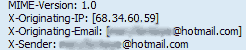
  • If you find a header with X-Originating-IP: followed by an IP address, that is the sender's IP address
  • SparksSpace007

    • Hotmail headers : Daniel ,In this case the IP address of the sender is [68.34.60.59]. This is be the IP address of the sender.

    SparksSpace008

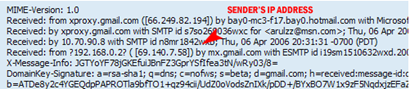
  • If you find a header with Received: from followed by a Gmail proxy like this
    • Hotmail headers : Daniel
    • Look for Received: from followed by IP address within square brackets[]. In this case, the IP address of the sender is [69.140.7.58].
  • SparksSpace009

  • Or else if you have headers like this
    • Hotmail headers : Daniel
    • Look for Received: from followed by IP address within square brackets[].
      In this case, the IP address of the sender is [61.83.145.129] .
  • If you have multiple Received: from headers, eliminate the ones that have proxy.anyknownserver.com.
  • Finding IP Address of the sender in Yahoo Mail!!

  • Log into your Yahoo! mail with your username and password.
  • Click on Inbox or whichever folder you have stored your mail.
  • Open the mail.
  • If you do not see the headers above the mail message, your headers are not displayed . To display the headers,
    • Click on Options on the top-right corner
    • In the Mail Options page, click on General Preferences
    • Scroll down to Messages where you have the Headers option
    • Make sure that Show all headers on incoming messages is selected
    • Click on the Save button
    • Go back to the mails and open that mail.
  • You should see similar headers like this:
    • Yahoo! headers : Daniel.
  • SparksSpace006

  • Look for Received: from followed by the IP address between square brackets [ ]. Here, it is 202.65.138.109.
  • That is be the IP address of the sender!
  • Finding IP Address of the sender in Gmail !!

    When you receive an email, you receive more than just the message. The email comes with headers that carry important information that can tell where the email was sent from and possibly who sent it. For that, you would need to find the IP address of the sender. The tutorial below can help you find the IP address of the sender.
    • Log into your Gmail account with your username and password.
    • Open the mail.
    • To display the headers,
      • Click on More options corresponding to that thread. You should get a bunch of links. Click on Show original
    • You should get headers like this:
      • Gmail headers : Daniel

    SparksSpace005

    • Look for Received: from followed by a few hostnames and an IP address between square brackets. In this case, it is 69.138.30.1
    • That is be the IP address of the sender!!
    NOTE:This will not work if the sender uses anonymous proxy servers

    Send FREE fake e-mails to anyone............

    http://fakesend.com/

    http://www.deadfake.com/

    http://www.webwizny.com/sendemail.php

    http://anonymailer.net/

    http://www.monkeys.com/formmailer/

    http://agave.garden.org/~aaronh/spoof.html

    http://www.download.com/Data-s-Anonymous-Mailer/3000-2369_4-10401819.html
    http://www.brothersoft.com/downloads/anonymous-email.html
    http://www.sharpmail.co.uk/
    http://www.theanonymousemail.com/
    http://www.anonymousspeech.com/
    http://www.advicebox.com/
    http://www.1netcentral.com/anonymous-email.html
    http://anonymous.to/
    http://www.mytrashmail.com/
    http://deadfake.com/
    http://deadfake.com/Send.aspx
    http://www.pcgraffiti.com/
    http://www.mutemail.com/
    http://www.gilc.org/speech/anonymous/remailer.html
    http://www.neomailbox.com/
    http://www.sendanonymousemail.com/
    http://www.freedownloadscenter.com/Best/anonymous-email.html
    http://www.emailman.com/anonymous/
    http://www.emailprivacy.info/remailers
    http://www.swarmail.com/
    http://www.fakemailz.com/
    http://www.findnot.com/
    http://cyberatlantis.com/anonymous_email.php
    http://lifehacker.com/software/email/send-anonymous-email-or-sms-186198.php
    http://anonymous-email-protection.qarchive.org/
    http://www.cryptoheaven.com/anonymous-email/anonymous-email.htm
    http://www.thinksecret.com/contact/anonymous.html
    http://web.mit.edu/ideas/www/contact_anony.htm
    http://www.infoanarchy.org/en/Anonymous_E-Mail
    http://shareme.com/showtop/sending-anonymous-email.html
    http://www.vicman.net/lib/email/anonymous
    http://www.downloadthat.com/windows/catalog/Anonymous_Bulk_Email
    http://www.rollyo.com/ereheman/anonymous_email/
    http://technorati.com/tag/anonymous+email
    http://anonymous-e-mail.qarchive.org/
    http://searchexchange.techtarget.com/originalContent/0,289142,sid43_gci1175062,00.html
    http://www.senditfake.com/

    Get ur email id with ur username and domain


    Get your Own Unique msn account @"whateveryouwant"


    Get your Own Unique msn account @"whateveryouwant"


    go to:
    https://accountservices.passport.net/reg.srf?fid=RegCredOnlyEASI&sl=1&vv=410&lc=1033

    and continue registering from here .. this is the easy way ...

    Copyright © 2008 - UCE GUYS - is proudly powered by Blogger
    Blogger Template