
Do you like to play flash games online? Have you ever wondered if there is a way to download those flash games to your computer and play them on your desktop without seeing distracting ads ?
Here we’ll show you how to do just that. First how to download flash games to your PC and then how to play them offline. So if you’re hooked on some addictive flash game this guide should help you get it offline and play it on your desktop.
1. Download Flash Games
Downloading flash games to your PC is a fairly easy process and there are lots of ways to do it. One way to get the game file is to look inside the page’s source code and find the direct link to the game file on the site. Another option is to wait for the game to load in your browser and later get it from the temporary files folder of your browser. Or you can just go to the site called File2HD and let it get the game file for you. We have already featured it earlier as a MP3 and video download tool for Myspace.
File2HD can help you download flash games from most of the online gaming sites. That being said, it doesn’t work with Kongregate, one of the best sites for Flash games. Althou I had no problems getting flash games from hugely popular sites like AddictiveGames.
So how does it work:
1. Go to the page with the flash game you want to download.
2. Copy the page URL and paste it into File2HD.com.
3. Set ‘Filter’ to ‘Objects’ option and click on ‘Get Files’ button.
4. Next, File2HD should retrieve the direct link to the game file.
download flash games
5. Right click on the link an use ‘Save Link As’ option to save the game to your computer.
2. Play Flash Games Offline
Once you have the game files on your system you can use a simple freeware program called FlashOffliner (Windows only) to take those raw .swf flash files, turn them into playable games, and neatly organize them under one menu.
Here are the steps you need to do:
1. Download and Install FlashOffliner.
Flash Offliner
The FlashOffliner setup comes with 2 games by default and 3 more that can be added later. If you want to install them as well then check step 4.
2. Once you have FlashOffliner up and running, you should see a new icon in the taskbar. Right click on the icon to see the list of available games and program options.
games offline
3. It takes two steps to add a downloaded flash game to your FlashOffliner games list. The first thing you need to do is click on the ‘Create New Flash Offliner Package’ and then point it to the downloaded file. Then you will be asked to name your new game and for a couple of more optional details. At the end it should create game_name.fop file for you.
4. Again right click on the FlashOffliner icon and this time select the ‘Install FlashOffliner Option’. Point the app to the newly created game_name.fop file to “install” the game.
5. This will install the game and add it to your FlashOffliner games. See screenshot below.
Flash Offliner - flash games offline
That’s about it, now you can simply click on the game of your choice and play it offline right on your desktop. By default the game window size is set to 800×600 but you can easily resize it to 400×300, 640×480, 1024×768 or Full Screen mode.
play flash games offline
Now that you know how to take flash games offline check out our short post on best online flash games.
Did you try downloading flash games to your computer before? Do you have anything to add to the above guide? Share your tips and thoughts in comments.
Jai Shree Ganesh

How To Download and Play Flash Games Offline
Posted by seepey_141_The blog CreatoR Labels: Flash, Games, Internet

To send free & anonymous sms log on to www.moogle.in and enjoy...
Gmail Dot trick is one of the craziest trick, i could ever imagine off. As the name says Dots (.) are gonna play major role in this trick. As most of the world is having gmail account, and many are interested in gmail tricks am gonna revel the secret now
So if you have a gmail account, you can try this trick. so for example take username:: derago21@gmail.com
password:: 1234
now the same username can be tried in the following ways as below
der.ago21@gmail.com // 1234
d.erago21@gmail.com // 1234
derago.21@gmail.com // 1234
dera.go21@gmail.com // 1234
Surprized with this kind of bug in gmail, share with your friends and impress them. Hope u Like the article, Feel free to Leave a comment. happy HackingSpeed up web browsing with OpenDNS
Posted by seepey_141_The blog CreatoR Labels: Internet, Networking, OpenDNS, Tricks, WindowsWhen you type in a domain name such as wingeek.com in your browser the computer must resolve the friendly name into an IP address of the server to download the web page and supporting files. Windows uses a DNS (domain name system) server to lookup this information. By default, Windows uses your ISP’s DNS server. Depending on your provider, the performance of their DNS resolving server varies. Some large national providers are known to provide unreliable and slow DNS servers.
The performance of the DNS server you are using is one component that affects the speed of your internet browsing. Since each domain name you type in must be resolved into an IP address, the amount of time that takes will delay the loading of any web page. Some users with overloaded ISP DNS servers can see delays in multiple seconds before web pages start to load.
OpenDNS provides free alternative DNS servers that anyone can use with any internet provider. Unlike many national internet providers, OpenDNS’s DNS servers are very fast and reliable. Using OpenDNS servers instead of your ISP servers will help you speed up your internet browsing by cutting down on the delay between resolving a domain name and getting the IP address so your browser can start loading the web page.
Configuring your computer to use OpenDNS servers instead of your ISP’s is a simple change that works in both Windows XP and Windows Vista:
1. Click on the Start Button and type in ncpa.cpl and hit Enter. In Windows XP Click on the Start Button, click Run and then type in ncpa.cpl
2. Right click on your active network connection that you use to connect to the Internet and select Properties.
3. On the Networking / General tab, select Internet Protocol (TCP/IP) (version 4 on Windows Vista & 7) and hit Properties.
4. On the properties screen, select Use the following DNS server addresses and then type in 208.67.222.222 in the preferred and 208.67.220.220 in the alternate boxes.
5. Hit OK twice and you are finished.
Visit OpenDNS.com to learn more about some of the advanced features of OpenDNS on top of the speed benefits.
Disable Country Download Slots Limit in MU
Posted by seepey_141_The blog CreatoR Labels: Internet, TricksNow there is a simple trick to get rid of “All the slots Assigned to your Country are in use, Try again later” message.
* Go to Google Translate Tool* Paste your Megaupload Link into Translate a web page box* And Translate it from English to German.* Hit the translate button and wait for the download page to load.* And have fun !!
When you want to grab all the latest news from social networking sites, browsing them through all is a tedious task. It can sometimes become so boring that you might leaving some sites, when you access it everyday.
Now access PopURLs and see difference. It gives you the list of most popular posts from the top social networking sites, in the form of links. It gives you a small summary of the links when your mouse rolls over a link.
It can be really popular, we see the content easy to find and read.
The best part is that you can personalize it the way you want it to look, and another best part is that it accepts OpenID, Facebook, Yahoo, Technorati, AOL Aim, and thus can login via any of these login ID’s
So you need not to create any further accounts and manage those, which gives a boost to a person to use it with ease.
Go ahead and give it a Try
Trace the e-mail origin of the sender
Posted by seepey_141_The blog CreatoR Labels: e-mails, Hacking, InternetEvery email comes with headers that carry important information that can tell where the email was sent from and possibly who sent it.For that, you would need to find the IP address of the sender.Some technical details require to track the IP address of an email.
The IP address is generally found in the headers enclosed between square brackets; for eg:[87.237.198.194]
Finding IP address in GMail
1. Log into your GMail account and open the email , which one you want to know the IP Adress
2. Click on the Reply link. Choose Show Original from the list.

It will open a window like the following .Press Ctrl+F to search ‘Received from’.There may be many “Received from” and those are IP addresses of all of servers involved in routing that email to you.

To find the first computer that originally sent the email, you’ll have to select the last one.Here you can see IP address is 87.237.198.194
Finding IP address in Yahoo Mail(Classic)
1.Log into your account
2.Usually Yahoo will not display headers in mails . Now you can enable this on the bottom right hand corner of the page .

3.Click on Full Headers option,here also you can see IP address next to ‘Received’

Yahoo Mail Beta
1.Log into your account
2.At the top right, there is a drop-down option where Standard Header is selected by default,change it to Full Header

3.In a different window , you’ll see the same information

Microsoft Outlook
1.Open a message.
2.On the Message tab, in the Options group, click the Dialog Box Laucher 
In the Message Options dialog box, the headers appear in the Internet headers box.

A dialog box will popup and at the bottom you’ll see the Internet Headers Box.To view the IP address clearly , you can copy it in a Notepad.

Now How to Track the location of an IP address
Once you got the IP address of the mail, with the help of the websites shown below you can locate the Country / State from which the email is sent.
1. IP2Location

6.Email Trace - Email Tracking Simply Copy and Paste below the email header of the message into the box provided on this page to trace an email.
Finding IP address of sender in Yahoo, Gmail, Hotmail.
Posted by seepey_141_The blog CreatoR Labels: e-mails, Hacking, InternetFinding IP Address Of the Sender In Hotmail!!
- Click on Options on the top-right corner
- In the Mail Options page, click on Mail Display Settings
- In Message Headers, make sure Advanced option is checked.
- Click on Ok button
- Go back to the mails and open that mail.
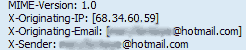
- Hotmail headers : Daniel ,In this case the IP address of the sender is [68.34.60.59]. This is be the IP address of the sender.
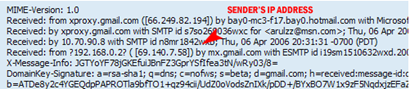
- Hotmail headers : Daniel
- Look for Received: from followed by IP address within square brackets[]. In this case, the IP address of the sender is [69.140.7.58].

- Hotmail headers : Daniel
- Look for Received: from followed by IP address within square brackets[].
In this case, the IP address of the sender is [61.83.145.129] .
Finding IP Address of the sender in Yahoo Mail!!
- Click on Options on the top-right corner
- In the Mail Options page, click on General Preferences
- Scroll down to Messages where you have the Headers option
- Make sure that Show all headers on incoming messages is selected
- Click on the Save button
- Go back to the mails and open that mail.
- Yahoo! headers : Daniel.

Finding IP Address of the sender in Gmail !!
When you receive an email, you receive more than just the message. The email comes with headers that carry important information that can tell where the email was sent from and possibly who sent it. For that, you would need to find the IP address of the sender. The tutorial below can help you find the IP address of the sender.- Log into your Gmail account with your username and password.
- Open the mail.
- To display the headers,
- Click on More options corresponding to that thread. You should get a bunch of links. Click on Show original
- You should get headers like this:
- Gmail headers : Daniel

- Look for Received: from followed by a few hostnames and an IP address between square brackets. In this case, it is 69.138.30.1
- That is be the IP address of the sender!!
Boost up your torrent download speed
Posted by seepey_141_The blog CreatoR Labels: Internet, Torrent, TricksOpen your torrent and Click->options->preferences->connections
PORT USED FOR INCOMING CONNECTIONS=45729
1,2 & 4 TICKED
MAXIMUM UPLOAD RATE=15
MAXIMUM DOWNLOAD RATE=1890
GLOBAL MAXIMUM NO.OF CONNECTIONS=200
MAXIMUM NO.OF CONNECTED PEERS PER TORRENT=2329
NUMBER OF UPLOAD SLOTS PER TORRENT=14
TICK ALL EXCEPT LAST BOX
MAXIMUM NO.OF ACTIVE TORRENTS=60
MAXIMUM NO.OF ACTIVE DOWNLOADS=63
RATIO IS:<=300%
..
Listent to FM Radio Online..
Posted by seepey_141_The blog CreatoR Labels: Fun, Internet, Music, Radioif you want to listen radio mirchi on your computer
open media player --> file --> open url -->type this site http://www.radiofiji.com.fj/asx/radiomir
RadioTarana-NewZealand ==> mms://l1.r2.co.nz/tarana-1
106.2 HUMFM - UAE ==> http://www.humfm.com/humfm.asx
RadioOfIndia - Bollywood ==> http://www.radioofindia.com/asf/bollywood.asx
RadioOfIndia - Bhajans ==> http://www.radioofindia.com/asf/bhajans.asx
RadioOfIndia - Classical ==> http://66.238.65.109/classical
DesiSoundz - India ==> http://desisoundz.com:8000
Sabras radio - UK ==> http://ct1.fast-serv.com:8744
Haagstad Radio - Holand ==> mms://81.205.146.32:21/haagstadradio
RadioTeenTaal - Paris ==> http://www.radioteentaal.com/masala128.wax
ApnaRadio - USA ==> http://www.apnaradio.com/live/media24/ApnaRadio.asx
BombayBeats FM ==> http://www.1.fm/player/energybbfm32k.asx
Punjabi Radio - UK ==> http://azul.streamguys.com/panjabradio?MSWMExt=.asf
Amrit Bani - UK ==> http://62.25.97.192/amritbani?MSWMExt=.asf
Yarr Radio - UK ==> mms://193.218.160.20/yaarradio
Sunrise FM - UK ==> http://62.25.96.7/sunrise
Radio XL - UK ==> http://www.vtuner.com/vTunerweb/mms/m3u13219.m3u
Asian Gold Radio - UK ==> http://62.25.96.7/asiangold
Asian Sound Radio - UK ==> http://www.vtuner.com/vtunerweb/mms/mms15278.asx
Sanskar Radio - UK ==> http://www.vtuner.com/vTunerweb/mms/m3u18290.m3u
Trishul 90.5 FM ==> http://www.vtuner.com/vtunerweb/mms/mms14734.asx
Radio Apni Awaz ==> mms://67.15.80.29/radioapniawaz
Radio India - Canada ==> mms://live.radioindiabroadcasting.com/liveradio
City 101.6 FM - Dubai ==> http://asx.abacast.com/arabian_radio-city-24.asx
DDLive Video - India ==> http://164.100.51.209/ddlive?MSWMExt=.asf
AajKal - Asian Network ==> http://stream.servstream.com/ViewWeb/BBCRadio_music/Event/BBCAsianNetwork_hi.asx
BBC News ==> http://www.bbc.co.uk/worldservice/meta/tx/nb/live_news_au_nb.asx
Cracks and Keygen of Softwares..
Posted by seepey_141_The blog CreatoR Labels: Cracks and Serials, InternetIf any one need cracks or keygens of softwares just search about them in following sites:
www.crackzplanet.com
http://www.zcrack.com/
http://www.keygen.ms/
www.astalavista.ms/
www.crackz.ws/k1.htm
http://www.bestserials.com/
http://www.astalavista.us/
DDL sites-For complete download of softwares and many things
Posted by seepey_141_The blog CreatoR Labels: Internet, movies, Music, SoftwaresThis summary is not available. Please click here to view the post.
Create a New folder with a single key Stroke..
Posted by seepey_141_The blog CreatoR Labels: Internet, Softwares, Tricks, WindowsThink about this…You are about to create 50 new folders and copy files in to
all those folders. How would you do it?
01. Open the windows Explorer
02. RIght Click somewhere in the space
03. Select New menu
04. Select Folder menu…
05. Ooofff…name it.
What a pathetic way of doing simple things …right? 
But here is a good news…we have a cool nifty shell addin to remove the head ache stated above.
Baxbex provides a cool new folder shortcut for windows explorer shell. Once you install this, all you need to do is to hit F12 and Name your folder.
This addin works for Windows 98, ME, NT, 2K, XP and Vista too. in Windows XP, you can even see an icon for create new folder on top command bar of the explorer.
Download Baxbex’s bxNewFolder (links to an executable)
Playing DVDs with Windows Media Player 11-Use Codec Pack
Posted by seepey_141_The blog CreatoR Labels: Codec Pack, Internet, Music, Softwares, WindowsSome players automatically download the codecs from websites to play the media, and some dont. In my case, windows media player 11 has never been able to download a codec to play DVDs successfully. This could be by design.
Initially I struggled a bit to find out what to install in order to run my DVD movies. Then i found this cool website called www.free-codecs.net which is a codec heaven for anyone.
I have installed XP Codec Pack and voila ! Now i can enjoy my movies
http://www.free-codecs.net/
VPN gives extremely secure connections between private networks linked through the Internet. It allows remote computers to act as though they were on the same secure, local network.
Advantages
* Allows you to be at home and access your company's computers in the same way as if you were sitting at work.
* Almost impossible for someone to tap or interfer with data in the VPN tunnel.
* If you have VPN client software on a laptop, you can connect to your company from anywhere in the world.
Disadvantages
* Setup is more complicated than less secure methods. VPN works across different manufacturers' equipment, but connecting to a non-NETGEAR product will add to difficulty, since there may not documentation specific to your situation.
* The company whose network you connect to may require you to follow the company's own policies on your home computers ( ! )
VPN goes between a computer and a network (client-to-server), or a LAN and a network using two routers (server-to-server). Each end of the connection is an VPN "endpoint", the connection between them is a "VPN tunnel". When one end is a client, it means that computer is running VPN client software such as NETGEAR's ProSafe VPN Client. The two types of VPN:
VPN Client-to-Server (Client-to-Box)

VPN Server-to-Server (Box-to-Box)

All NETGEAR routers support "VPN Passthrough", but "passthrough" simply means the router does not stop VPN traffic — you still need two endpoints.
The whole purpose of VPN is to prevent data being altered, so, for example, a passthrough router that is also running NAT will break the VPN connection.
Some free VPN's
1- http://anchorfree.com/downloads/hotspot-shield/
2- http://www.iopus.com/iPig/
3- http://www.secureix.com/
4- http://www.peer2me.com
5- http://www.relakks.com
6- http://www.your-freedom.net/
7- http://www.swissvpn.net/
http://www.freedomain.co.nr/
http://www.dot.co.sr/
http://www.uni.cc/
http://www.cjb.net/
http://www.dot.tk/
http://www.da.ru/
http://www.nic.de.vu/
http://www.joynic.com/
http://www.unonic.com/
http://www.free-url-redirection.com.ru/
http://je.ro/en/
http://www.active.ws/domains/
http://www.smartdots.com/register/?LANG=US
http://POST_ONLY_DIRECT_URLS
http://moo.no
http://www.no-ip.com
www.4-all.org
http://www.pt.vu
http://www.rd5.net/
www.rg3.net
www.vai.la/
www.1br.net/
en.mylivepage.com/
freewebs.com
bravehost.com
dostweb.com
de.vu
us.tt
uk.tt
ca.tt
eu.tt
es.tt
fr.tt
it.tt
se.tt
dk.tt
be.tt
de.tt
at.tt
tk
cx.la
de.gg
de.pn
de.tp
de.be
de.hm
de.nr
de.md
de.tt
de.ms
de.tc
de.tf
ch.tp
ch.pn
ch.gg
at.tp
at.pn
at.md
at.gg
elite.to
warez.by
warez.to
t3.to
hitz.to
redir.to
war3z.to
quality.by
appz.by
stuff.by
upload.by
gfx.by
user.by
crackz.by
dl.am
us.pn
us.mn
us.ms
us.tt
us.tf
us.tc
fr.mn
fr.pn
fr.ms
fr.tt
uk.pn
uk.mn
uk.tt
uk.md
ru.tf
ru.tc
ru.md
pl.tf
pl.tc
es.tc
es.tt
es.md
it.tc
it.mn
it.pn
cn.ms
cn.mn
cn.pn
jp.md
jp.pn
net.tf
net.tc
net.ms
info.ms
biz.md
eu.pn
eu.tp
eu.tf
eu.tc
edu.tf
edu.tc
co.nr
box.ag
all.at
back.to
beam.at
been.at
bite.to
board.to
bounce.to
bowl.to
break.at
browse.to
change.to
chip.ms
connect.to
crash.to
cut.by
direct.at
dive.to
drink.to
drive.to
drop.to
easy.to
everything.at
fade.to
fanclub.ms
firstpage.de
fly.to
flying.to
forward.to
fullspeed.to
fun.ms
gameday.de
germany.ms
get.to
getit.at
hard-ware.de
hello.to
hey.to
hop.to
how.to
hp.ms
jump.to
kiss.to
listen.to
mediasite.de
megapage.de
messages.to
mine.at
more.at
more.by
move.to
musicpage.de
mypage.org
mysite.de
nav.to
notrix.at
notrix.ch
notrix.de
notrix.net
on.to
page.to
pagina.de
played.by
playsite.de
privat.ms
quickly.to
redirect.to
rulestheweb.com
run.to
scroll.to
seite.ms
shortcut.to
skip.to snap.to
soft-ware.de
start.at
stick.by
surf.to
switch.to
talk.to
tip.nu
top.ms
transfer.to
travel.to
turn.to
vacations.to
videopage.de
virtualpage.de
w3.to
walk.to
warp9.to
window.to
yours.at
zap.to
zip.to
meine-erste-homepage.com/subdomain.php
gratisdinge.de/kostenlos/kostenlose-domain.php
kostenlose-domain.de.cx/webspace.shtml
r-ene.de/kostenloses/domain.php
mailde.de
subdomain.tv
http://dx.am
orgfree.com
ueuo.com
altervista.org
funpic.org
host.sk
List of the Best Sites to Hindi Bollywood Watch Movies Online
Posted by seepey_141_The blog CreatoR Labels: Fun, Internet, moviesDo Have a Look at these Sites and tell me if your Like Them or not  123onlinemovies - The site features a great Movie database which includes Movies from Old Time, from Past One Decade and some latest additions. Either you can watch the Movies Online or you can download the Movies for free accordingly.


http://wellcene.blogspot.com/
http://hindisongsdownloading.blogspot.com/
http://firstseomaster.blogspot.com/
http://bell-phones.blogspot.com/
http://more-poker-7u.blogspot.com/
http://threx.blogspot.com/
http://mobile-phone-service.blogspot.com/
http://television-online-blogs.blogspot.com/
http://movies-online-blogs.blogspot.com/
http://music-online-blogs.blogspot.com/
http://business-online-blogs.blogspot.com/
http://software-online-blogs.blogspot.com/
http://gambling-online-blogs.blogspot.com/
http://hardware-online-blogs.blogspot.com/
http://games-online-blogs.blogspot.com/
http://videogames-online-blogs.blogspot.com/
http://health-online-blogs.blogspot.com/
http://astrology-love.blogspot.com/
http://onlinemakefriends.blogspot.com/
http://marketingseo2008.blogspot.com/
http://mobile-phone-service.blogspot.com/
http://directorysubmissionlist.blogspot.com/
http://twenty-twenty-worldcup.blogspot.com/
http://tour-honeymoon.blogspot.com/
http://rajasthan-tour-travels.blogspot.com/
http://wallpaperblogs.blogspot.com/
http://ringsgemstone.blogspot.com/
http://wholesaleflowerblogs.blogspot.com/
http://giftsblogs.blogspot.com/
http://kitchenfurnitureblogs.blogspot.com/
http://indiatravelgroup.wordpress.com/
http://www.indiatravelgroup.com/
http://firozkhan.wordpress.com/
http://1hairtransplant.wordpress.com/
http://indiatravelgroup.wordpress.com/
http://graphicsphotography.wordpress.com/
http://1indiatravels.wordpress.com/
http://realestatesayal.wordpress.com/
http://graphicsdesignsayal.wordpress.com/
http://increasingtraffic4site.wordpress.com/
http://iccmotorsports.wordpress.com/
http://valentinegiftsindia.wordpress.com/
http://himachaltraveltour.wordpress.com/
http://realtynahomes.wordpress.com/
http://rajasthantourholidays.wordpress.com/
http://healthfitnesstip.wordpress.com/
http://flowerpicturesayal.wordpress.com/
http://fashionclotes.wordpress.com/
http://fashionandclothing.wordpress.com/
http://homeandgardens.wordpress.com/
http://superwebsitetemplate.wordpress.com/
http://tourstoindia.wordpress.com/
******************************************************************************************************* ( Posted By F.Khan Sayal )
Very Most Useful Product for your business but only 4 you So Please read must and comment
http://webdesigndevlopment.blogspot.com/
http://indiatravelgroup.blogspot.com/
http://increasingtraffic4site.blogspot.com/
http://1hairtransplant.blogspot.com/
http://artsandphotographics.blogspot.com/
http://businessandjobswithfinance.blogspot.com/
http://sayalcomputerinternet.blogspot.com/
http://onlinevideogames-gambling.blogspot.com/
http://healthfitnessmedicine.blogspot.com/
http://homesimprovment.blogspot.com/
http://kidsandteensayal.blogspot.com/
http://newspaperandmedia.blogspot.com/
http://shoppingsayal.blogspot.com/
http://gamessayal.blogspot.com/
******************************************************************************************************* ( Posted By F.Khan Sayal )
Very Most Useful Wordpress Blog only 4 u So Please read must
http://artsphotography.wordpress.com/
http://businessjobs.wordpress.com/
http://computersinternet.wordpress.com/
http://gamessports.wordpress.com/
http://entertainmenttelevision.wordpress.com/
http://graphicsdesigns.wordpress.com/
http://musicaudiovideo.wordpress.com/
http://photographicsstudio.wordpress.com/
http://bookshopping.wordpress.com/
http://educationstudy.wordpress.com
http://newsandmediapress.wordpress.com/
http://artsandentertainmentsayal.wordpress.com/
http://accountingbusiness.wordpress.com/
http://businessandsocieties.wordpress.com/
http://businessecommerce.wordpress.com/
http://educationaltraining.wordpress.com/
http://internationalbusinesstrading.wordpress.com/
http://financeinvest.wordpress.com/
http://marketingwithadvertising.wordpress.com/
http://smallbusinesspportunities.wordpress.com/
http://biotechnologyandpharmaceuticals.wordpress.com/
http://businessforservice.wordpress.com/
http://electronicsandelectrical.wordpress.com/
http://financialandservices.wordpress.com/
http://food4healthcare.wordpress.com/
http://informationtechnologics.wordpress.com/
http://realestateandfinance.wordpress.com/
http://telecommunicationscell.wordpress.com/
http://internetornet.wordpress.com/
http://systemsecurityforpc.wordpress.com/
http://softwaresdevelopment.wordpress.com/
http://computerandtechnologics.wordpress.com/
http://mobilewithcomputing.wordpress.com/
http://multimediatechnologics.wordpress.com/
http://newspaperandgroup.wordpress.com/
http://phpandjavaprogramming.wordpress.com/
http://educationalstudent.wordpress.com/
http://shoppingproduct.wordpress.com/
http://businessinformationtechnology.wordpress.com/
http://boardandcardsgames.wordpress.com/
http://computerandhandgames.wordpress.com/
http://cashinogambling.wordpress.com/
http://videotilegames.wordpress.com/
http://web4hosting.wordpress.com/
http://sportsfantasies.wordpress.com/
http://healthandalternatives.wordpress.com/
http://conditionsdiseases.wordpress.com/
http://healthcareindustries.wordpress.com/
http://medicalmedicine.wordpress.com/
http://mentalhealthfitness.wordpress.com/
http://skininbeauty.wordpress.com/
http://dentistryproblem.wordpress.com/
http://healthforfitness.wordpress.com/
http://insurancefinance.wordpress.com/
http://proteinnutrition.wordpress.com/
http://searchenginseoptimization.wordpress.com/
http://productswholesaleshop.wordpress.com/
http://weightlossherbalife.wordpress.com/
http://homecookingfood.wordpress.com/
http://homefamilies.wordpress.com/
http://homesandgarden.wordpress.com/
http://homebuyersorpurchase.wordpress.com/
http://homesimprovements.wordpress.com/
http://selffinance.wordpress.com/
http://catinpets.wordpress.com/
http://societylaw.wordpress.com/wp-admin/
http://magazinesandezines.wordpress.com/
http://newsonpaperandtelevision.wordpress.com/
http://martialsarts.wordpress.com/
http://automobilemotorcycles.wordpress.com/
http://travelstour.wordpress.com/
http://indiantraveltour.wordpress.com/
http://kpobpo.wordpress.com/
http://kpobposervices.wordpress.com/
http://booksdictionaries.wordpress.com/
http://regionalcountries.wordpress.com/
http://scienceinstitutions.wordpress.com/
http://holidayspackage.wordpress.com/
http://classifiedsshopping.wordpress.com/
http://beautyproductshop.wordpress.com/
http://shoppingcloths.wordpress.com/
http://furnitureinhome.wordpress.com/
http://shoppinggifts.wordpress.com/
http://jewellryshop.wordpress.com/
http://musicormovie.wordpress.com/
http://weddingsayal.wordpress.com/
http://shopwholesaleshops.wordpress.com/